
Photometric Stereo for Printed Packaging Inspection: The Print Fades, the Shape Stays
 kotai2003
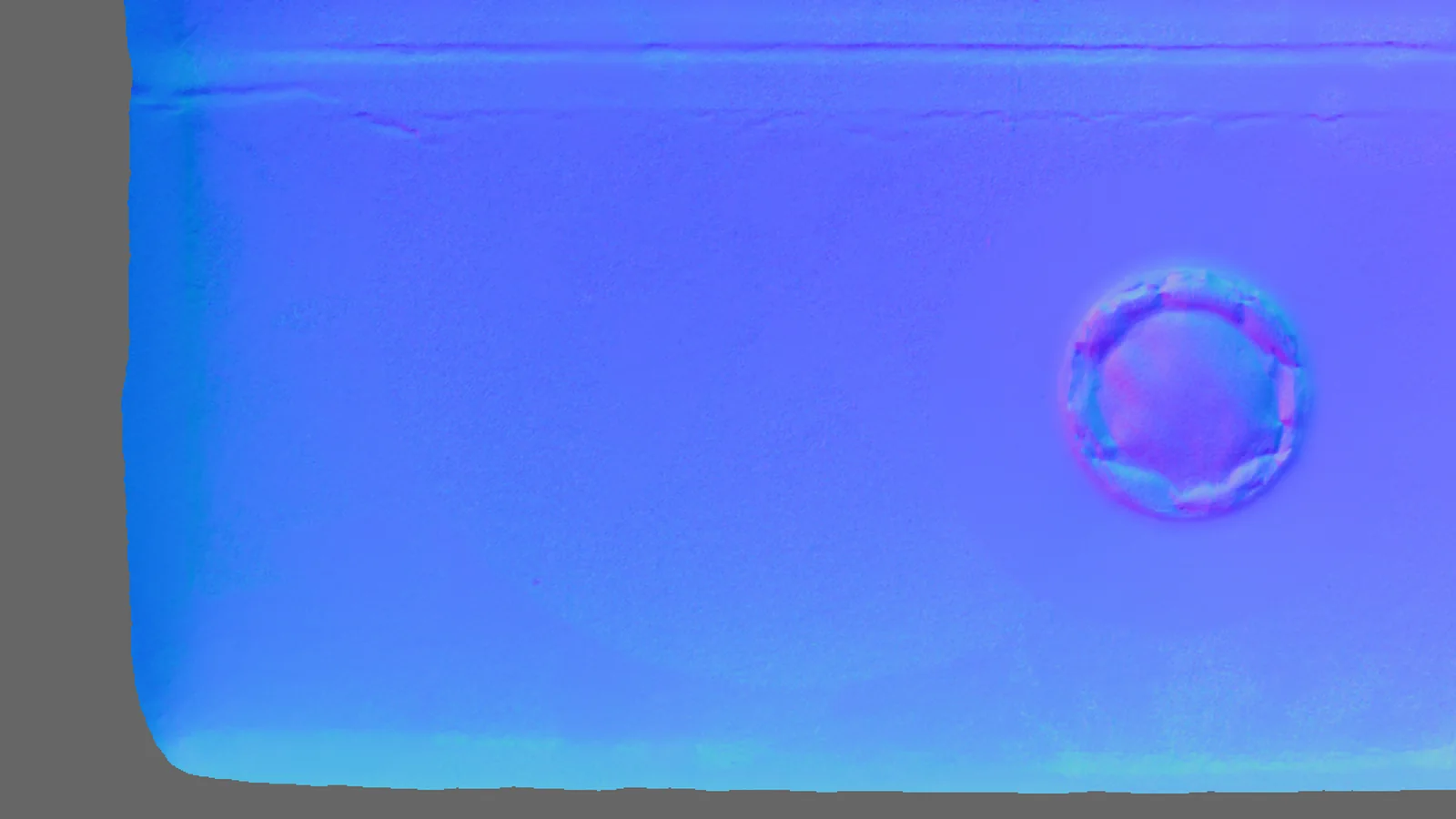
Surface Normal, around the straw hole and a horizontal fold. Unprocessed (cropped and downscaled only).
When you inspect printed packaging for shape, the print itself gets in the way. We imaged the top panel of a store-bought vegetable juice carton with FORESIGHT STEREO, our photometric stereo sensor. The colorful graphics all but disappeared, while the folds, wrinkles, and the area around the straw-hole seal remained. Below are the images, the numbers, and the limit we ran into.
Why print is noise when you are looking for shape
Cartons, folding boxes, and pouches are often checked for crushing, dents, creases, and seal condition. In a conventional image, though, the colors and patterns of the print overlap with the light-and-shadow cues that tell you about surface relief.
On a panel covered with a tomato photo and leaf graphics, it is hard to tell where the print ends and a crease or wrinkle begins. If you look for relief through color and pattern, the print becomes noise.
So what happens if you set color aside and look only at shape?
What we imaged
- Date: November 20, 2026
- Sample: The top panel of one store-bought vegetable juice carton (the face with the straw hole, the top seam, and the printed best-before date). A single good unit; this was an in-house imaging test, i.e. a technology demo
- Sensor: FORESIGHT STEREO, which measures surface orientation (surface normals) by photometric stereo
- Capture: 8 images under lighting from 8 directions, area camera, 3000×2160 pixels
FORESIGHT STEREO outputs four images: LIVE, 2D Texture, Surface Normal, and 3D Surface. This post compares three of them: LIVE, where the print appears as-is; Surface Normal, which maps surface orientation; and 3D Surface, which is reconstructed from those normals.
Finding 1: The print disappears (57% down to 0.1% or less)
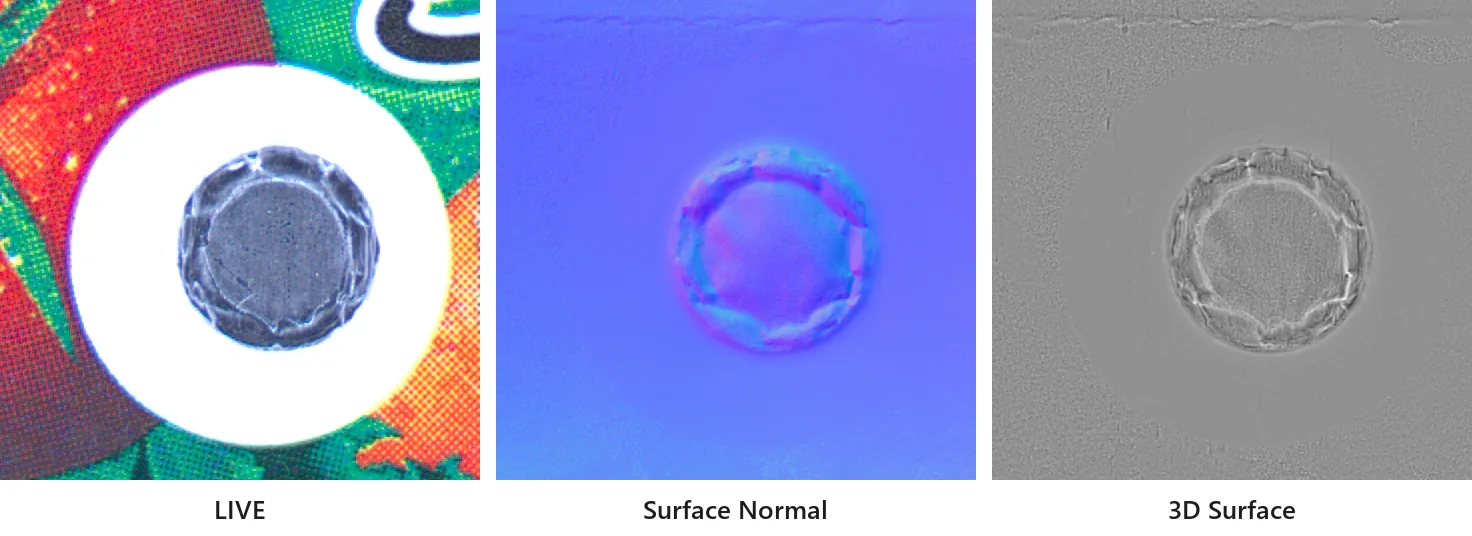
Left to right: LIVE / Surface Normal / 3D Surface, around the straw hole. Unprocessed (cropped and downscaled only).
In LIVE, the colorful print, including the tomato photo and leaf graphics, is clearly visible. In Surface Normal and 3D Surface, the same area shows almost none of it. What stands out instead are the fine wrinkles and dimples around the film seal covering the straw hole.
We also put a number on it. Around the straw hole (480×480 pixels), we compared the contrast between the red and green print and the white background:
| Image | Red vs. white | Green vs. white |
|---|---|---|
| LIVE | 57.1% | 57.6% |
| 3D Surface | 0.0% | 0.1% |
The contrast went from 57% in LIVE to 0.1% or less in 3D Surface.
Contrast is the difference in mean values expressed as a percentage of the full 8-bit range (255). LIVE uses luminance; 3D Surface uses raw pixel values. Pixels within a 150-pixel radius of the straw-hole center are excluded.
Finding 2: The shape stays
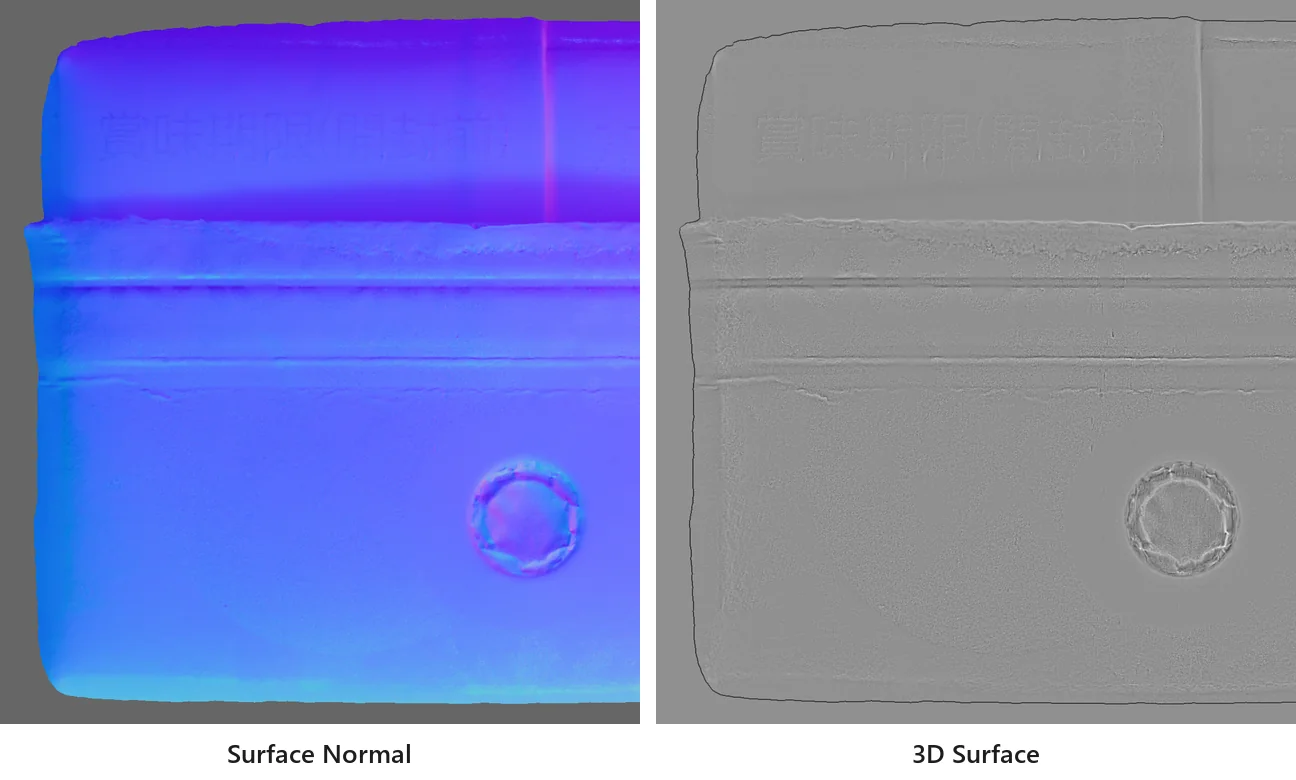
Left 60% of the top panel. Surface Normal / 3D Surface. Unprocessed (cropped and downscaled only).
Across the wider panel, the shapes hidden under the print become readable:
- The top seam: a vertical line
- Folds: two running horizontally
- Wrinkles and waviness: in the paperboard itself
- The seal area: fine wrinkles and dimples around the film over the straw hole
- Rounded corners: at the edges of the top panel
In LIVE, these features blend into the printed pattern; looking at surface orientation alone brings them out.
The limit: dark black print leaves a faint trace

Best-before label area. LIVE / Surface Normal. The vertical seam line and a faint trace of the black print (an example of the limit). Unprocessed (cropped and downscaled only).
Not all print vanishes. Dark black characters printed on a white background, such as the best-before date, left a faint trace in the shape images.
We have not determined whether this comes from the thickness of the ink or from the computation. Color print, on the other hand, did not remain. Keep this in mind if your packaging carries dark black printing.
Where this could apply, and how photometric stereo works
This was a technology demo on a single good unit. Even so, seeing folds, wrinkles, and seal-area shape through busy graphics suggests the approach could be applied to visual inspection of printed packaging such as cartons, folding boxes, and pouches, for crushing, dents, creases, and seal condition.
Why does the print disappear? Photometric stereo captures several images of the same object, changing only the direction of the light, and calculates surface orientation (the normal) from how each pixel's brightness changes. In a conventional image, color and pattern overlap with the shading from relief. Photometric stereo estimates orientation and reflectance separately, so differences in color have little way into the shape image. Note that 3D Surface is reconstructed by integrating the normals; it is not a measurement of absolute height.
For more on the method, see our photometric stereo technology page. The comparison images are also on this use case page, and other imaging examples are on our use cases page.
Summary
Print is noise when you are looking for shape. By extracting surface orientation alone, photometric stereo made the carton's colorful print nearly disappear (contrast around the straw hole: 57% in LIVE, 0.1% or less in 3D Surface) while folds, wrinkles, and the seal area remained. Dark black print still leaves a faint trace, a limit worth knowing before you test your own samples.
Want to see how your own printed packaging looks in surface normals? Contact us to discuss your samples.